 AutoListing
How-to
How Often Can You Relist on Facebook Marketplace?
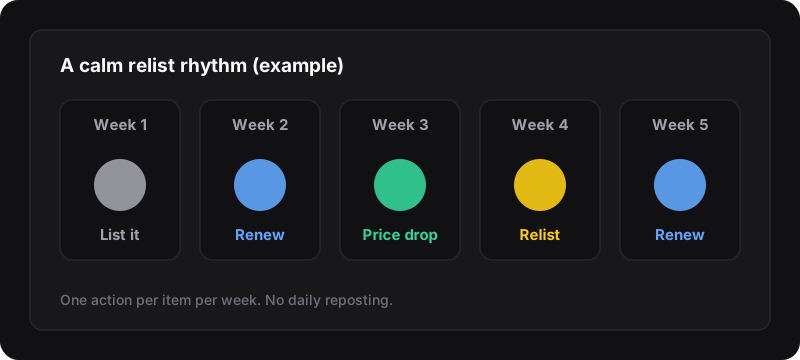
Facebook doesn’t publish a limit on how often you can relist. Most sellers renew a listing about once a week (the Renew option itself usually appears after 7 days) and only delete and relist when renewing stops bringing views. Relisting the same item every day is a bad idea: it looks like spam and can get listings or your account limited.
What Facebook officially says
Not much. Facebook’s Commerce Policies cover what you can sell and how listings must look, but there’s no public number for how many times you can renew or relist. What we do know:
- The Renew option is offered on listings that are around a week old, so Facebook itself suggests a weekly rhythm.
- Posting the same thing over and over is the classic spam pattern, and Facebook’s systems act on spam (hiding listings, limiting Marketplace access).
- Listings must describe a real item you have and can sell. Relisting doesn’t change that.
Everything below is seller experience and common sense, not an official rule. Treat it as a safe default.
A safe relist rhythm
| When | What to do | Why |
|---|---|---|
| Day 0 | Post a strong listing | The first days matter most |
| Day 7 | Renew | Free bump, keeps saves |
| Day 14 | Small price drop or better main photo | Gives the algorithm and buyers a reason to look again |
| Day 21–30 | Relist as a new listing | Fresh date when renewing has run out of steam |
| After that | Repeat every 1–2 weeks at most | Steady, not spammy |
Why not relist every day?
- It looks like spam. A burst of identical new listings from one account is easy for automated systems to flag.
- Buyers notice. People who browse your area see the same item “just listed” again and again, and it hurts trust.
- It doesn’t fix the real problem. If an item gets views but no messages, the price or the photos are the issue, not the date.
Change something between relists
A relist works best when the listing is also better than before:
- New first photo. It’s what people see in the feed. Daylight, whole item, plain background.
- Sharper title. Write what buyers search for: brand, item, size or model.
- Price step. A small, visible drop (for example from $120 to $105) often brings messages. Plan your steps with the Marketplace price drop planner.
- Fuller description. Dimensions, condition, pickup area, availability.
More ideas in how to write a Marketplace listing that sells.
If you sell a lot of items
Resellers often refresh in batches: one day a week, they renew what can be renewed and relist what’s gone stale. Doing it by hand takes several minutes per item. AutoListing lets you tick the listings in Chrome’s side panel and relist them in one click, which makes a weekly routine realistic. The rhythm advice stays the same with a tool: once a week is plenty.
Signs you’re overdoing it
- Listings stuck “pending” or rejected more often than before
- A warning or restriction on your Marketplace access
- Views dropping on new listings across the board
If you see these, slow down, remove duplicates, and read why your Marketplace listing isn’t showing up.