 AutoListing
Relist Facebook Marketplace Listings in One Click
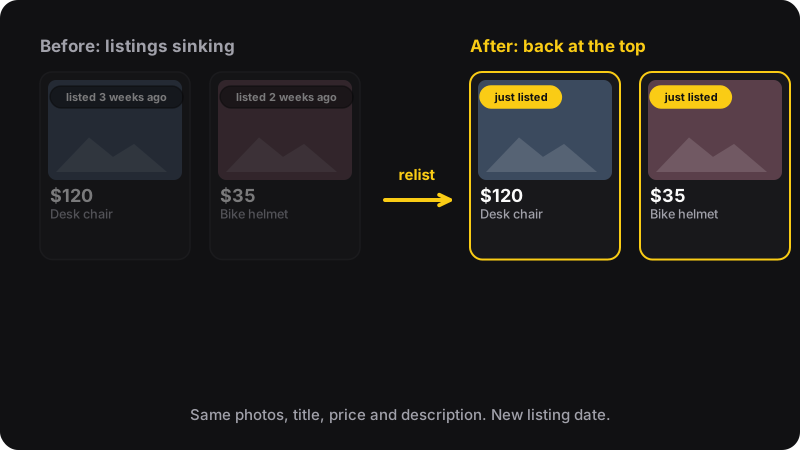
Old listings sink and stop getting messages. Relisting by hand means re-uploading photos and retyping everything, item by item. AutoListing does it for you from Chrome’s side panel: select your listings, click Relist.
- 5 free relists / month
- No Facebook password
- Chrome side panel
- $2/month unlimited
How it works
AutoListing does what you’d do by hand, recreate the listing then delete the old one, for every listing you select.
-
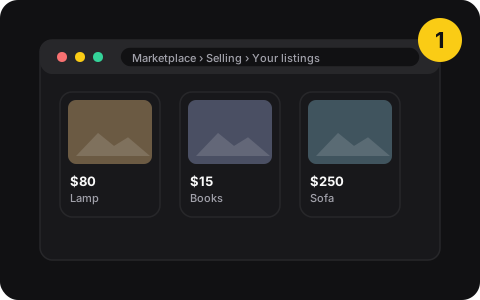
1. Open Marketplace
Click the AutoListing icon. It opens in Chrome’s side panel and takes you to your Marketplace selling page.
-
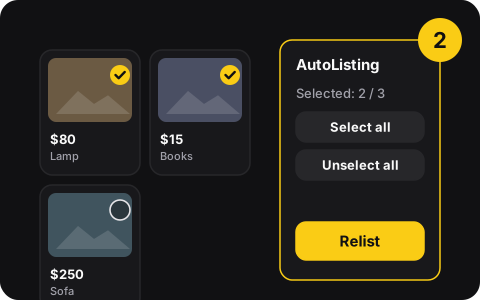
2. Select listings
Tick the listings to refresh, or Select all. The panel shows how many you’ve selected.
-
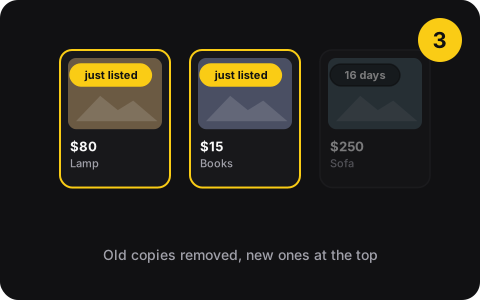
3. Click Relist
Each one is posted again with the same photos, title, price and description, and the old copy is removed.
What AutoListing does
- One-click relistRelist several listings at once instead of one by one.
- Same content, fresh datePhotos, title, price and description are copied as they are.
- Select all or pickTick individual listings or select everything in one go.
- Native side panelLives in Chrome’s side panel, next to Facebook. No popups.
- Works in the backgroundSwitch tabs while it relists.
- Email sign-inNo password at all, and never your Facebook password.
Pricing
Free
$0
- 5 relists every month
- Try once without an account
Monthly
$2 /month
- Unlimited relists
Annual
$20 /year
- Unlimited relists
One relist = one listing. Free credits reset every month. Cancel anytime from the side panel.
Privacy
- Works inside your own Facebook session in Chrome
- Account = your email + a one-time code
- Only runs on facebook.com
- Never asks for your Facebook password
- No browsing history tracking
- Doesn’t message buyers or change prices
Good to know before you relist
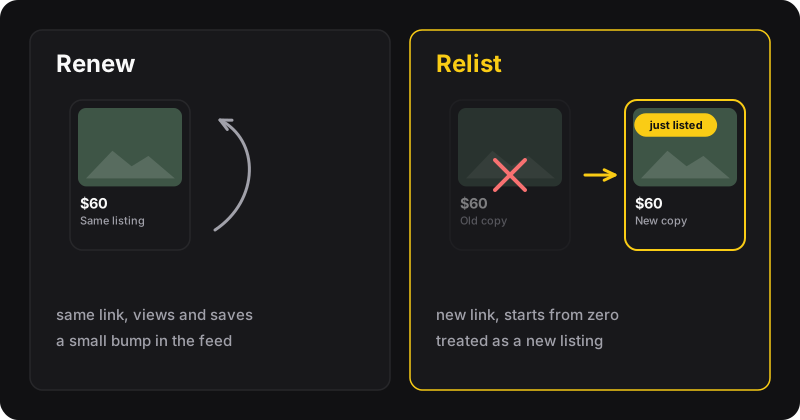
Relisting replaces the listing
Old views and saves don’t carry over, and the link changes. Messages already exchanged stay in Messenger. Prefer renewing when it’s available.
Keep a calm rhythm
Facebook doesn’t publish limits, but daily reposting looks like spam. Once a week per item is plenty. Why.
Questions
What does AutoListing do?
It relists your Facebook Marketplace listings in one click. For each listing you select, it posts a new listing with the same photos, title, price and description, then removes the old one, so the item shows as just listed again.
Is AutoListing free?
You can try it once without an account. With a free account (email sign-in) you get 5 relists every month. For unlimited relisting, it’s $2 a month or $20 a year. One relist = one listing.
Does AutoListing need my Facebook password?
No. It works inside your own Facebook session in Chrome, like you would. Your AutoListing account only uses your email address with a one-time code.
Is relisting the same as renewing?
No. Renewing bumps the same listing and keeps its link and saves. Relisting creates a new listing and deletes the old one. See how to renew a listing and how to relist.
Can my account get in trouble?
Relisting real items at a reasonable pace is normal seller behavior. Posting the same item many times a day, duplicate listings, or items that break Facebook’s Commerce Policies can get listings hidden or Marketplace access limited, with or without a tool. You’re responsible for following Facebook’s rules.
Popular guides
- Manual vs extensionHow to Relist on Facebook Marketplace: By Hand or in One ClickRelisting puts an old Marketplace listing back at the top as a new one. The manual delete-and-repost method step by step, and the one-click way with AutoListing.
- How-toHow to Renew a Facebook Marketplace ListingRenew a Marketplace listing to bump it back up without reposting. Where the Renew button is, when it shows up, and what to do when it’s gone or stops working.
- FixFacebook Marketplace Listing Not Showing Up? 7 FixesMarketplace listing with no views or missing from search? Check these 7 causes, from review and policy issues to location and stale listings, and fix each one.
- Free toolMarketplace price drop & relist plannerEnter your price and your lowest acceptable price, get a week-by-week plan: renew, drop, relist.