 AutoListing
How-to
How to Write a Facebook Marketplace Listing That Sells
A Marketplace listing that sells has four things: a bright first photo showing the whole item, a title with brand + item + key detail, a fair price slightly below similar listings, and a description that answers the obvious questions (size, condition, pickup). Here’s a step-by-step template you can copy.
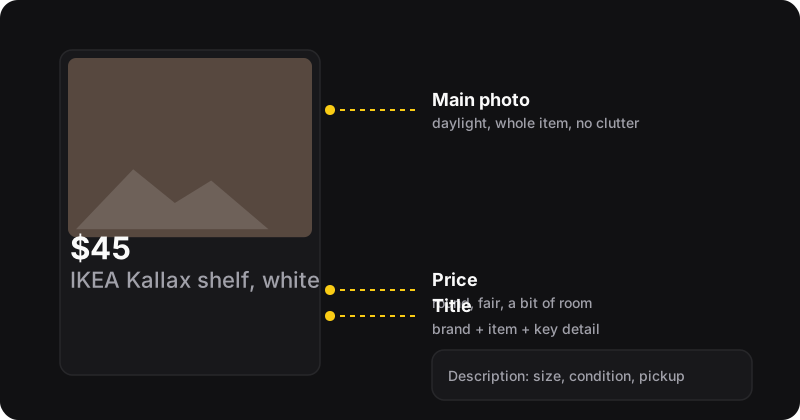
Step 1: photos
Buyers decide from the thumbnail in a fraction of a second, so the first photo matters most.
- Shoot in daylight, near a window or outside. Turn off the flash.
- Show the whole item in the first photo, filling most of the frame, on a plain background.
- Add 4 to 8 more photos: other angles, labels or model numbers, size reference, and any flaws, clearly.
- Clean the item and the space. A wiped table in a tidy corner looks worth more.
Show the flaws
A scratch shown in photo 5 is a non-issue. A scratch discovered at pickup is a lost sale and a wasted trip.
Step 2: the title
Write the words a buyer types into search, most important first:
| Weak | Strong |
|---|---|
| Nice chair | Herman Miller Aeron chair, size B, fully adjustable |
| Bike for sale | Trek FX 2 hybrid bike, medium frame, 2021 |
| Shelf | IKEA Kallax 4x4 shelf, white, 147 × 147 cm |
Skip ALL CAPS, emojis and lists of unrelated keywords. They don’t help search, and they look spammy.
Step 3: the price
- Search for the same item near you and note what fair listings ask.
- Price a little under the middle if you want a fast sale, with a bit of room for offers.
- Use round numbers buyers can process instantly ($45, not $43.50).
Not sure how to lower it over time? The Marketplace price drop planner gives you a week-by-week schedule.
Step 4: the description
Answer the five questions every buyer asks. Copy this template:
Description template
What it is: [brand, model, size or dimensions]
Condition: [used/like new, how long, any flaws (see photo X)]
Included: [cables, manual, box, accessories]
Why selling: [moving, upgraded, no longer needed]
Pickup: [area or nearby landmark, when you’re available, delivery yes/no]
Step 5: details that filter buyers in
- Category: the most specific one that fits.
- Condition: honest. “Used, good” sells fine.
- Location: check it’s your real area. Buyers filter by distance.
- Brand, color, size fields when Facebook offers them: they feed filters and search.
After posting
- Reply to messages fast, with availability, place and time in one message.
- After a week, renew the listing.
- No messages? Improve the first photo or drop the price. See 4 ways to bump a listing.
- Still stuck after 3–4 weeks? Relist it as a new listing.
Good listings make relisting work
Relisting gives a listing a new date, not new appeal. Fix the photo, title and price first, then relist. Once your listings are in good shape, AutoListing can relist them in one click from Chrome’s side panel. It copies exactly what you wrote, so the effort you put into a great listing carries over every time.