 AutoListing
How-to
How to Renew a Facebook Marketplace Listing
Open Marketplace → Selling → Your listings, find the listing, and choose Renew listing. Facebook usually offers this only on listings that are about a week old or more, and it keeps the same listing with its views and saves. When the option is missing or no longer brings views, relisting is the next step.
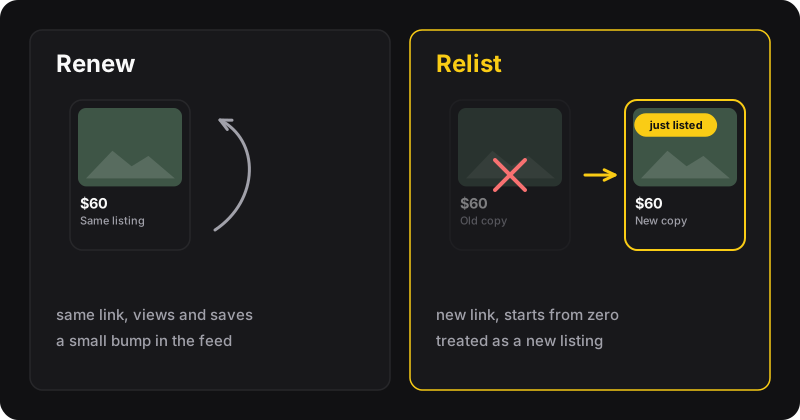
What renewing does
Renewing tells Facebook your item is still available and gives the listing a fresh push, so it can show up again near the top for nearby buyers. Unlike relisting, it doesn’t create a new listing:
- Same link, so anyone who saved it still has it
- Same photos, price and description
- Free and takes a few seconds
The trade-off: the boost is usually smaller than a brand-new listing, and Facebook decides when the option is available.
Renew a listing on a computer
- Go to facebook.com/marketplace/you/selling (Marketplace → Selling).
- Find the listing under Your listings.
- Click the listing’s menu (⋯) or open it.
- Choose Renew listing and confirm.
Renew a listing in the Facebook app
- Open the Facebook app and go to Marketplace.
- Tap your profile icon in Marketplace, then Your listings.
- Tap the listing, then ⋯.
- Tap Renew listing.
Facebook moves its menus around regularly, so the exact labels can differ slightly between app versions and countries.
When does the Renew option appear?
Facebook doesn’t publish exact rules, but sellers consistently report the same pattern:
- The option shows up once a listing is about 7 days old.
- After renewing, you wait roughly another week before you can renew again.
- After several renewals, the option can disappear for that listing.
Facebook also sometimes sends a notification suggesting that you renew a listing. That’s a good time to do it.
No “Renew” button? Here’s why
- The listing is too recent. Wait until it’s a week old.
- You’ve already renewed it several times. Time to relist it as a new listing.
- It’s marked as sold or pending. Mark it as available again first.
- The listing is under review or was removed. Check its status, and see why a Marketplace listing isn’t showing up.
- The app is out of date. Update it, or try from a computer.
Renew first, relist later
A simple routine works well for most sellers:
- Week 1: list the item with good photos and a fair price.
- Week 2: renew it.
- Week 3: drop the price a little, or improve the main photo.
- Week 4: if it still doesn’t move, relist it as a new listing.
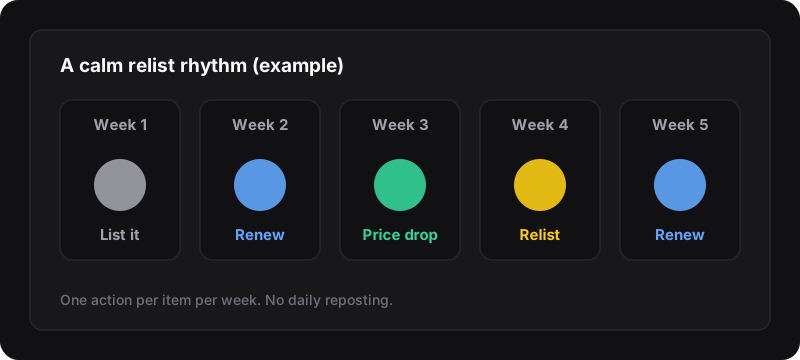
More on this rhythm in how often should you relist on Facebook Marketplace.
Lots of listings to refresh?
Renewing is per listing, and the button isn’t always there. When you have a dozen items stuck at the bottom, AutoListing relists the ones you select in one click from Chrome’s side panel. It keeps the same photos, title, price and description, and removes the old copies. You get 5 free relists a month with a free account.