 Group Exporter for FB
Export Facebook Group Members to CSV
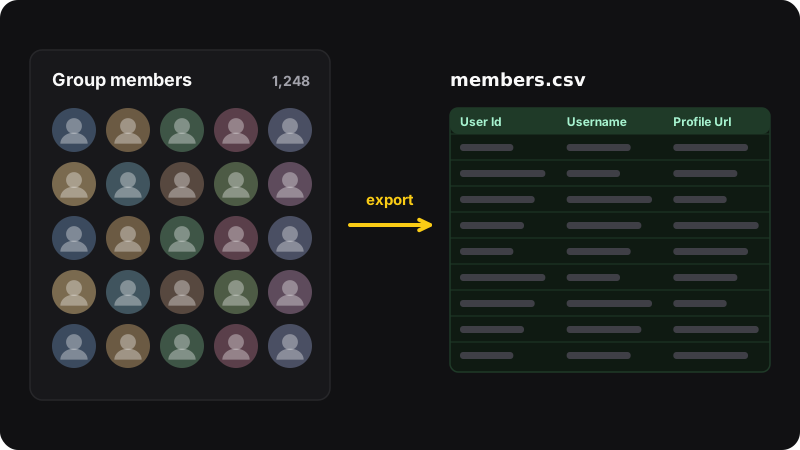
Facebook has no “export members” button. Group Exporter for FB adds one: open a group’s members page, click export, and download every member you can see as a CSV for Excel or Google Sheets. Free, no limit, no account.
- Free
- No member limit
- No account
- Runs in your browser
How it works
Group Exporter reads the members page with your own Facebook session, page after page, and writes a CSV.
-
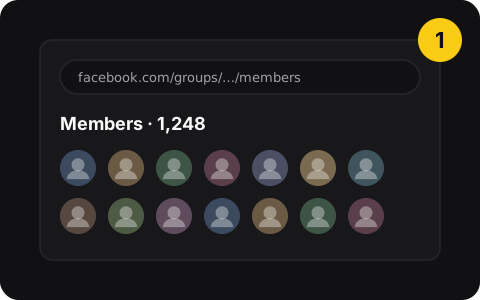
1. Open the members page
Go to the group’s Members page, or paste the group link in the extension popup.
-
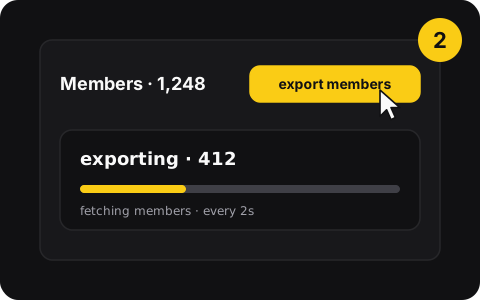
2. Click “export members”
The button sits next to the member count. Watch the counter; pause and continue anytime.
-
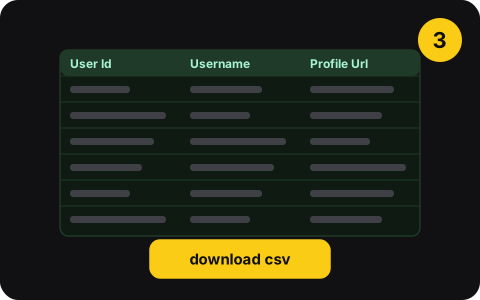
3. Download the CSV
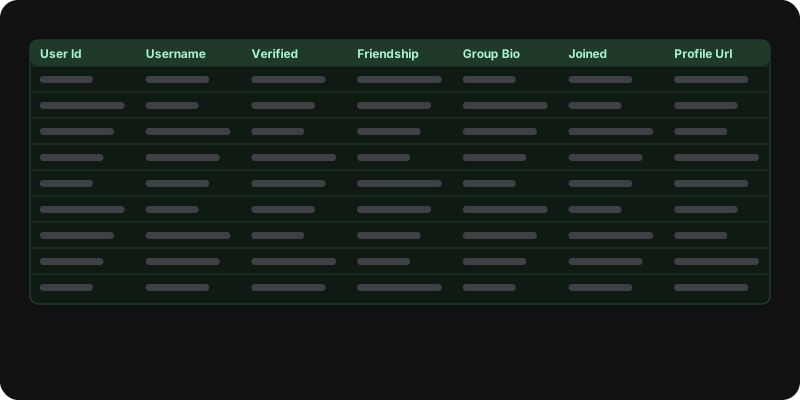
One row per member: ID, name, profile link, bio, join status and more.
What Group Exporter does
- Every member you can seeNo cap on the number of members.
- Clean CSVUser Id, Username, Is Verified, Friendship Status, Group Bio, Join Status, Profile Url…
- Pause and continueStop anytime and pick up where you left off.
- Polite by defaultAdjustable request interval and member limit to avoid rate limits.
- Opens in ExcelUTF-8 with BOM so names with accents display correctly.
- Light or darkFollows Facebook’s theme. Interface in English and French.
Free
Everything included
$0
- No member limit
- No account, no subscription
Group Exporter for FB is new: if the Chrome Web Store still shows it in review, the link works as soon as it’s approved.
Privacy
- Runs in your browser with your own Facebook session
- Data goes from Facebook straight to your CSV
- Only runs on facebook.com
- No server, no account, no tracking
- Never asks for your Facebook password
- No emails or phone numbers (Facebook doesn’t show them)
Use it responsibly
Facebook’s Terms and privacy laws
Facebook’s Terms restrict collecting data by automated means without its permission, and laws like GDPR may apply to member lists you keep. Using the extension is your responsibility.
Good uses
Export groups you run to welcome new members, moderate and track growth. Keep files private and short-lived. Never use them for unsolicited messages.
Questions
Is Group Exporter for FB free?
Yes. No paid plan, no member limit, no account.
What does the CSV contain?
One row per member with: User Id, Username, Is Verified, Friendship Status, Group Bio, Join Status Text, Extracted At, Profile Url and Avatar. It opens in Excel, Google Sheets or Numbers. See how to open it properly.
Does it export emails or phone numbers?
No. Facebook doesn’t show those on member lists, and Group Exporter only saves what the members page shows you.
Is it allowed?
Facebook’s Terms say you may not collect data from its products using automated means without its permission, and privacy laws like GDPR may apply to any member list you keep. Using Group Exporter is your decision and responsibility. Use it to run your own group (welcoming, moderating, tracking growth), keep files private, and never use them for unsolicited messages.
Is my data sent anywhere?
No. Everything runs in your browser with your own Facebook session. There’s no server, no account and no tracking: the data goes from Facebook straight to your CSV file.
Popular guides
- Manual vs extensionHow to Export Facebook Group Members to a CSV FileFacebook has no “export members” button. How to build a member list by hand for small groups, and how to export every member to CSV in one click with an extension.
- How-toHow to Track New Members (and Who Left) in Your Facebook GroupGroup admins: see who joined your Facebook group since last week, welcome them, and spot who left. Facebook’s built-in views plus a simple export-and-compare method.
- How-toHow to Open a Facebook Group Member List in Excel or Google SheetsOpen a Facebook group member CSV in Excel or Google Sheets without broken accents, then sort, filter and clean it. Steps for Excel, Sheets and Numbers.
- Free toolCompare two member exportsDrop an old and a new member CSV: see who joined and who left. Runs in your browser, nothing is uploaded.