 TrustStudy
Comparison
Best AI Study Tools for Students in 2026
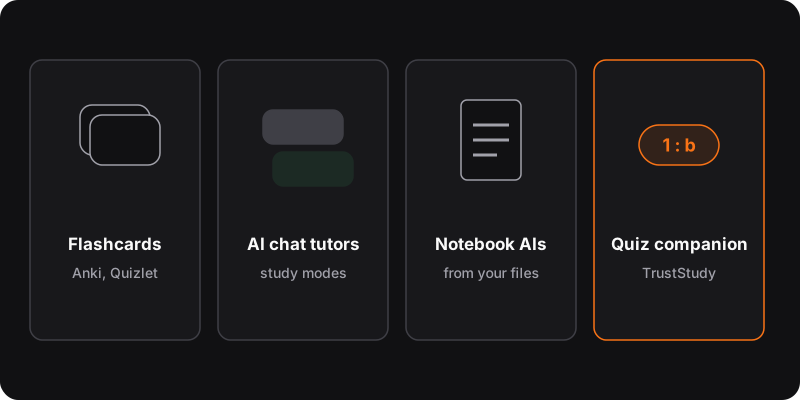
Different tools fit different parts of studying. Flashcard apps like Anki or Quizlet handle spaced repetition. AI chat assistants (ChatGPT, Claude, Gemini) work as tutors, and several now offer study or learning modes. Notebook AIs like NotebookLM work from your own documents. TrustStudy (ours) checks practice quiz answers on the page with one shortcut.
Disclosure
We make TrustStudy, one of the tools below. We’ve tried to be fair: the other tools are excellent at what they do. Features and prices change often, so check before choosing. Information as of October 2026.
Quick comparison
| Tool | Best for | Price |
|---|---|---|
| Anki | Spaced repetition flashcards | Free on desktop and Android |
| Quizlet | Ready-made flashcard sets, quick games | Free tier + paid plan |
| ChatGPT, Claude, Gemini | Tutoring, explanations, study modes | Free tiers + paid plans |
| NotebookLM | Studying from your own documents | Free tier |
| TrustStudy (ours) | Checking practice quiz answers fast | 3 free credits, from $5/month |
1. Anki: the spaced repetition workhorse
Free, open-source flashcards that schedule each card based on how well you know it. Steep learning curve, but unbeatable for memorizing vocabulary, definitions, formulas. Pairs well with AI-generated flashcards from your notes.
2. Quizlet: flashcards made easy
Millions of ready-made sets, simple study modes and games. Easier than Anki to start with; some features need a subscription.
3. AI chat assistants as tutors
ChatGPT, Claude and Gemini can quiz you, explain concepts at your level and check your reasoning. Several have added study or learning modes that guide you step by step instead of handing out answers. Use them with the “try first” rule from how to use AI to study.
- Flexible: any subject, any question
- Can be confidently wrong; free plans have limits
4. NotebookLM and “notebook” AIs
Google’s NotebookLM answers questions based on documents you upload (lecture notes, PDFs, slides) and cites them. Useful to study a specific course without the AI drifting off-topic.
5. TrustStudy (our extension)
TrustStudy is a Chrome extension for one job: checking practice questions fast, on the page where they are. Answer first, press Alt+X, and the answer shows in the corner, with reasoning in the Eco and Max modes. It reads the question by selection, page text or screenshot, and lets you pick among models from OpenAI, Anthropic, Google and DeepSeek.
- No copy-paste: one shortcut on any page, PDF or question set
- Choose speed (Lite) or reasoning (Eco, Max)
- Credits: 3 free, then $5/month (300), $10 (1,000) or $20 (2,000)
- Not a chat: for deep dives, use an AI tutor
- Only for practice: using it on graded tests or exams is cheating
A simple study stack
- Learn: class, textbook, or an AI tutor for explanations.
- Practice: quizzes, answering on your own first. Check with TrustStudy or by pasting into a chat. See studying with practice quizzes.
- Remember: put what you got wrong into Anki or Quizlet, and review on a schedule (try the spaced repetition planner).